Troubleshooting printing issues
Last updated: May 4, 2026
First steps to take when something isn't printing the way you'd expect from Scout.
Overview
Most printing in Scout works by opening your browser's built-in print dialog. That means almost every printing issue comes down to one of three things:
The print dialog never opened
The print dialog opened, but the preview looks wrong
The print dialog looked fine, but the printed page came out wrong
Before reaching out for help, try the steps below. They resolve the large majority of printing issues.
Tip: Whenever you contact support about a printing issue, share the device you are using (iPhone, PC, Android, etc.), which browser you're using (Chrome, Safari, Edge, Firefox), and what you were trying to print.
The print dialog never opened
If you clicked a Print button in Scout and nothing happened, work through these in order:
Check for a blocked pop-up. Some printing flows briefly open a new tab or window. Look for a pop-up blocker icon in your browser's address bar and allow pop-ups for Scout.
Try again after the page has fully loaded. If you click Print while the page is still loading data, the dialog can fail to open. Wait until everything on the page has appeared, then try again.
Refresh the page and try printing again.
Try a different browser. Scout works best in Google Chrome. If you're using Safari, Firefox, or Edge and the print dialog won't open, try Chrome.
In some cases, your browser may have settings that conflict with being able to print documents in Scout. If you are using Chrome or Edge:
Navigate to:
chrome://settings/content/pdfDocuments
edge://settings/content/pdfDocuments
In your browser's search bar and ensure that "Open PDFs in Chrome/Edge" is selected.
Ensure that "Open PDFs in Chrome/Edge" is selected
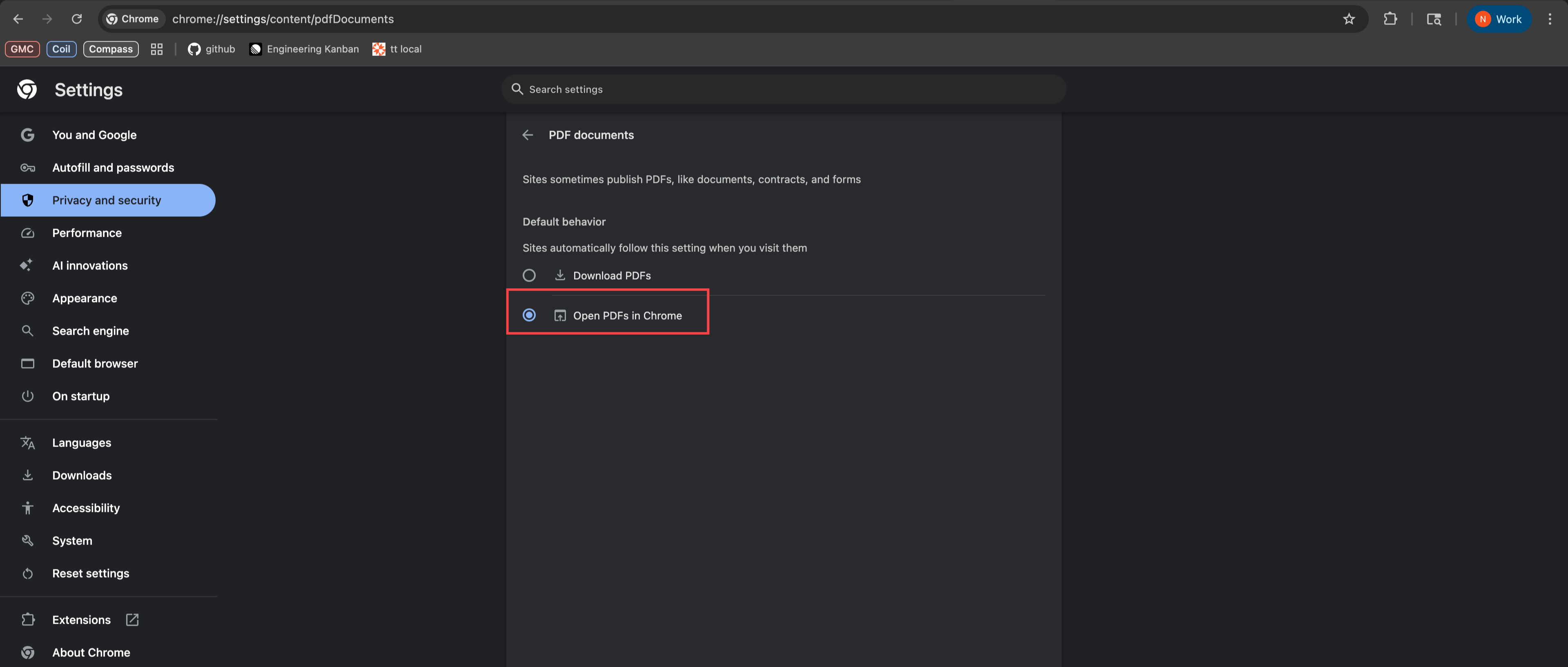
Refresh Scout and try again.
Common issues at a glance
Issue | First things to try |
Nothing happens when I click Print |
|
When to contact support
If you've tried the steps above and still can't print, reach out to Scout support and include:
Which page or document you were trying to print
The browser and operating system you're using
A screenshot of the print preview, if you were able to open one
A description of what came out vs. what you expected